

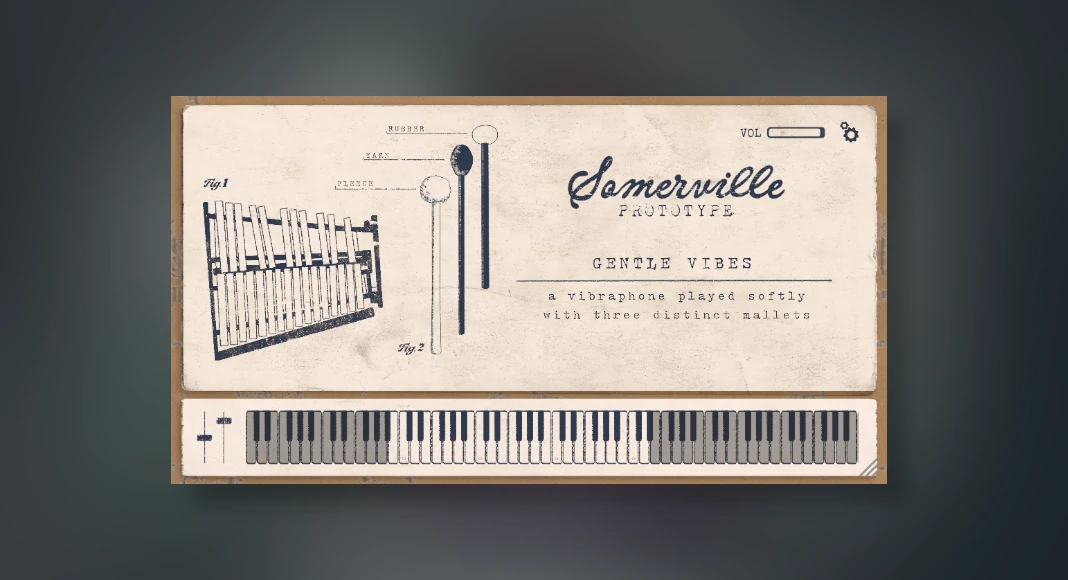
Somerville has released a free vibraphone mallet percussion-style drum machine instrument (VST plugin) which comes with 6 different presets.
This is a highly versatile plugin when it comes to music production!
This free mallet VST simply provides some amazing percussion mallet sounds, which also come with loads of different modulations, which can alter the final sound signal output.
It’s packed with 6 different presets, which all provide different styles of vibraphone mallet sound output. More info on the vibraphone from Study Smarter for those who are not sure what a vibraphone actually is.
This is a great plugin for any modern music producer looking to improve their percussions; in fact, this plugin could also be used to build the main lead virtual instrument melody within any musical composition.
Simple design, yet powerful sound signal output and gentle vibes – this is definitely a plugin most producers need to try.
Percussion use is very important when it comes to composing a decent modern musical composition; most modern music producers within any style of production genre use percussion to improve their overall composition and add more depth and rhythm and build a unique drum pattern. Check out the ultimate guide to percussion by Ujam for more in-depth info.
Locating The 6 Vibraphone Mallet Presets Within The Plugin
Unlike most VST plugins, the browser presets are actually located within the settings of the plugin section, which can be easily overlooked, so we have made a quick guide on how to find all 6 of the mallet presets.
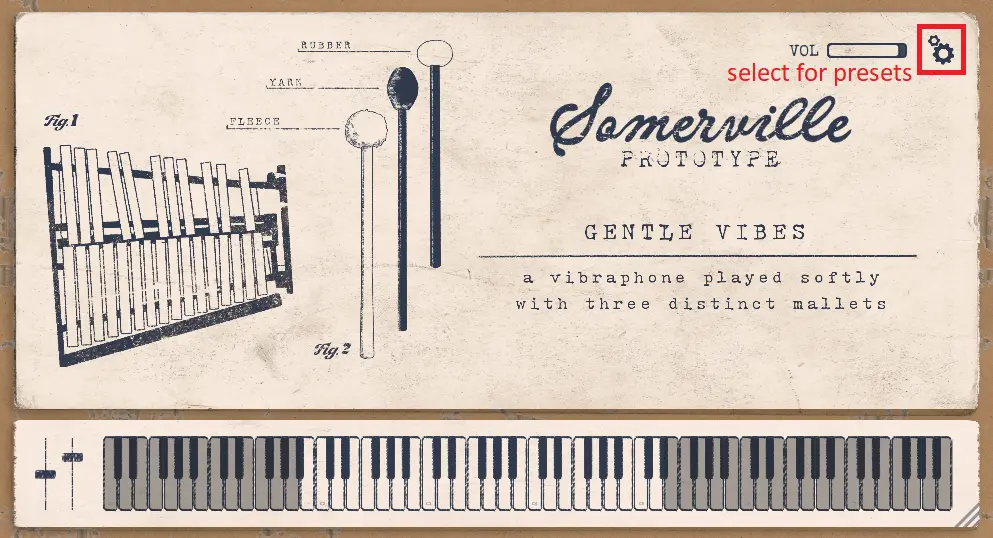
To locate the presets, the user will need to select the settings icon first.
This is located within the plugin itself; check it out below.
 This will then load up the preset selection section along with the mixing effects section and adjust settings, which can be altered to provide the required mallet sound signal output.
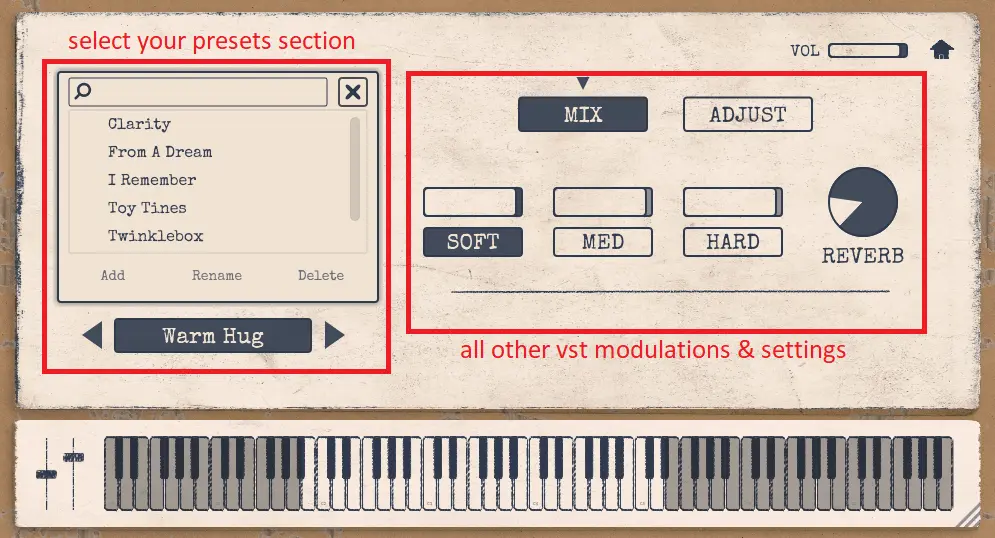 It’s as simple as that to select the presets within this plugin.
Also, if there are any modern music producers who are looking for some decent free drum machine VST plugins which include some decent percussions, check out some of the ones recommended below.
- DrumVault – Free Drum Machine Style Instrument
- Caelum Audio – Free Drum Machine
- Drumtastic – Free Drum Pad Machine
Check it out in action below!
Main Features of the Gentle Vibes Vibraphone Mallets Plugin
- 6 different presets.
- Mix soft, medium and hard modulations, which later gain on certain frequencies within the sound signal.
- Built-in reverb effect modulation.
- Built-in adjust settings, which modulate the HPF and LPF as well as the pedal sustain settings, which include the wow settings and flutter settings.
- Overall volume gain modulation.
- Resizable GUI.
- Friendly on CPU.
Buzz Overview of Gentle Vibes Vibraphone Mallets VST Plugin
When it comes to percussions and combining these with virtual instruments, Somerville Sounds have done a great job in combining these two together.
Here at ProducersBuzz we have downloaded and tried this awesome plugin. Yes, this plugin is awesome!
This plugin can be used within the drums or the melody, making it quite a hybrid plugin itself!
The sound quality is decent, and the plugin is easy to use, although locating the presets could have been easier. We made a guide which explains this above.
Some of the vibraphone mallet sounds within this VST are warm and vibrant, come with a pad-style texture and are also quite subtle and soft.
Please note: This plugin is free to download and will require the user to enter “0” when downloading the plugin. Of course, users can input their own “thanks for this VST” price-number to show gratitude towards the developers behind this amazing plugin.
Also, the developers have also called this plugin a prototype, but it worked without any issues and very well when we tested this plugin.
Download Info
- Supports: Windows and macOS.
- Comes in VST3, AU and AAX plugin formats.
- Free to download. (External)







 which comes with 6 different presets. )